Client portals
Clients who only log in to check leads or reply to messages judge your platform by this page. Make it look owned.
Theme
Palette
Saved to this browser. Applied before the page paints, so it never flashes.
Layer 02 · Login page designs
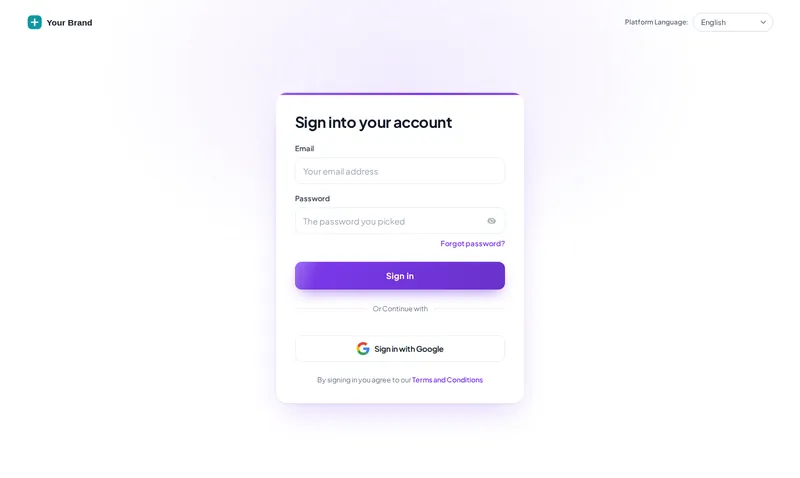
The GHL custom login page is the first screen of your platform, and the one every client sees most. The customizer gives you 16 animated login designs that restyle the real GoHighLevel login, two-factor and password reset screens, installed with one CSS line on your white-label domain.
Included from Sub-Account SoloOne-time payment, lifetime accessLogin emailed within minutes (max 24 hours)
Problem, then outcome
Before
Your white-label domain still opens on the stock grey login card, so the brand starts after the client has already decided you are generic.
After
The login opens on an animated design in your colours, with your logo, before anyone types a password.
Before
The two-factor and password reset screens fall back to default styling and look like a different product.
After
All three screens share one design, so nothing looks broken at the moment a client is already anxious about access.
Before
Changing the login meant editing raw CSS in agency settings and hoping.
After
You change the design in the editor with a preview; the CSS line in GoHighLevel never has to change again.
Try it live
Face lab · real engine, no login
Loading the live preview
Minimal glow The CSS that ships to GoHighLevel, applied to a copy of the real login markup. Switch screens to check two-factor and password reset, which clients see more often than you think.
The short answer
GoHighLevel lets agencies add custom CSS to the white-label login page. The customizer writes that CSS for you: pick one of 16 designs in the editor, preview it on the sign-in, two-factor and reset screens, then paste one @import line into Agency Settings → Company → White Label → Custom CSS. Changes later update without touching GoHighLevel again.
Set it up
You do this yourself in the customizer's live editor. If your line of code is already in GoHighLevel, saving is the last step; if not, it is a one-time paste into Agency Settings → Company → White Label → Custom JS.
Choose from 16: minimal glow, cinematic, gradient mesh, photo wall, holographic and more.
Preview sign-in, two-factor code and password reset before you publish.
Copy the @import line from the editor into Agency Settings → Company → White Label → Custom CSS. Once.
Use cases
Clients who only log in to check leads or reply to messages judge your platform by this page. Make it look owned.
The security-code screen gets the same design, so staff are not surprised by a different-looking step.
Switch designs for a launch or a new year in the editor without touching the code in GoHighLevel.
If clients reach you at app.youragency.com, this is the finishing piece of the white label.
Quotable facts
Screenshots


Which package
The foundation. Pick a theme and a UI kit, set your logo and colours, choose a login design, and every sub-account your clients open wears the same brand.
Login emailed within minutes (max 24 hours)
Questions
16, all animated, and every package includes all of them. Each one styles the sign-in, two-factor and password reset screens.
In Agency Settings → Company → White Label → Custom CSS. You paste one line, @import url("https://customizer.ghlcustomercare.com/lc/YOUR-KEY.css");, with your own key filled in by the editor.
The white-label login page is the one GoHighLevel serves on your agency domain, so yes, the design shows wherever your white-label login appears.
Only the look. The login form, two-factor and reset all work exactly as GoHighLevel built them; the design is CSS on top.
Yes. Designs pick up your brand colour and logo from the editor, and some use a photo you can change.
Yes. Pick another design in the editor and save. The CSS line in GoHighLevel stays the same, so the new design shows on the next visit.
All of them. Login designs start in Sub-Account Solo at $169 one-time.
The designs are CSS animation rather than video, so they load with the page and fall back to a still look where motion is reduced.
Keep building the look
All ten layers · Package comparison · How the one-line install works · What white-label sub-accounts actually brand
Layer 02
Buy Sub-Account Solo, get your login by email, and set it up yourself in the live editor today.
One-time payment, lifetime access · login emailed within minutes (max 24 hours) · install in about 2 minutes
Accessibility
Text size
Display
Turning animation off tears down the WebGL grid and the particle field — they stop running, they are not just hidden.